
KoboldCpp doesn't come with an AI model; you add one. A model is one large file that ends in .gguf.
The easy way: a newbie template
Section titled “The easy way: a newbie template”A template fills in the launcher for you and downloads the model when you click Launch. The Chatbot templates also add voice input, read-aloud and picture understanding.
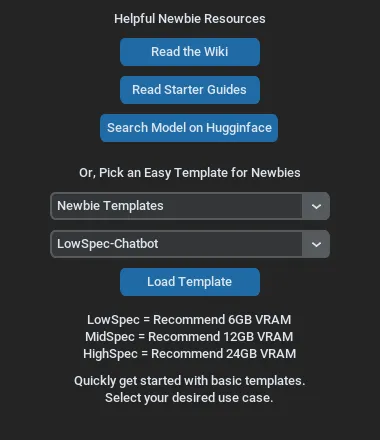
In the launcher, click Get Help and the dropdown Newbie Templates.
Pick a template for your graphics card's memory (VRAM; how to check):
- Chat with the AI:
LowSpec-Chatbot: recommend for 6 GB VRAM or no GPU. Chat or roleplay, also has vision, speech generation and voice recognition capabilities.MidSpec-Chatbot: recommend for 12 GB VRAM or more. Chat or roleplay, also has vision, speech generation and voice recognition capabilities.
- Generating Images:
LowSpec-ImageGen: recommend for 6 GB VRAM or no GPU for creating and editing AI images. Launch the dedicated SDUI when prompted.LowSpec-ImageGen: recommend for 12 GB VRAM for creating and editing AI images. Launch the dedicated SDUI when prompted.
- Generating Music:
LowSpec-MusicGen: recommend for 6 GB VRAM or no GPU for generating music. Launch the dedicated MusicUI when prompted. You can add an extra LLM model for better lyrics generation.
- Agent and Coding:
LowSpec-CodingAgent: recommend for 6 GB VRAM or no GPU for coding tasks. Launches an agentic terminal.MidSpec-CodingAgent: recommend for 12 GB VRAM for coding tasks. Launches an agentic terminal.
- Chat with the AI:
Click Load Template.
Or: download one model file
Section titled “Or: download one model file”These are some basic models that work in KoboldCpp. Click one to download it. For more models, visit Huggingface.
In the launcher, click Browse next to GGUF Text Model: and select the file. PicX Real is an image model: it goes into Image Model on the Image Gen tab instead.
Launch
Section titled “Launch”Click Launch.
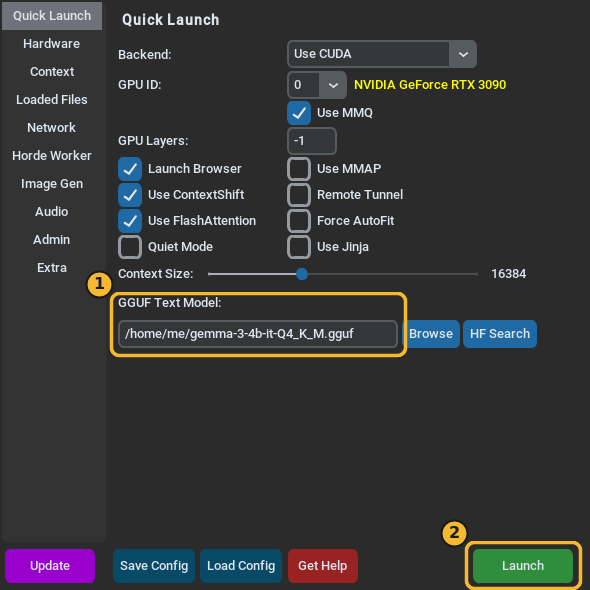
The launcher closes, and the console window shows the model loading. With a template, it first downloads the files, which can take a while. The next launch reuses them.